PenguinShooter Tutorial
Our classic demo game that first demonstrated Lightning ingame payments. Looking for the new game? Try LightningBlocks.
About PenguinShooter
PenguinShooter is a web based demo game that demonstrates how to trigger ingame events with Lightning Network Payments. In contrast to other games with ingame payments, you don't have to buy 1000 diamonds first with your credit card. Instead, Lightning Invoices are placed within the game that can be paid by any Lightning Wallet. When the payment is settled, the specific event inside the game occurs.
Your goal
In PenguinShooter your goal is to gain EXP points to lvl up by defeating monsters.
Payments
This game is about Lightning Payments.
You first need a Lightning Wallet with some bitcoins.
Inside the game, click on any QR code. This loads the QR code on the display field in the right corner and displays the payment request in the browser above the game window.
You have one of the following options to pay the invoice:
- Scan the QR code with your mobile wallet
- Copy and paste the payment request into a wallet you control on your computer
- Install GetAlby, so you just need to click the "Pay" button.
But how easy is it really?
You are playing the game and stand in front of a shield that says "1 Sheep 5 Satoshi" and you want to spawn that sheep.
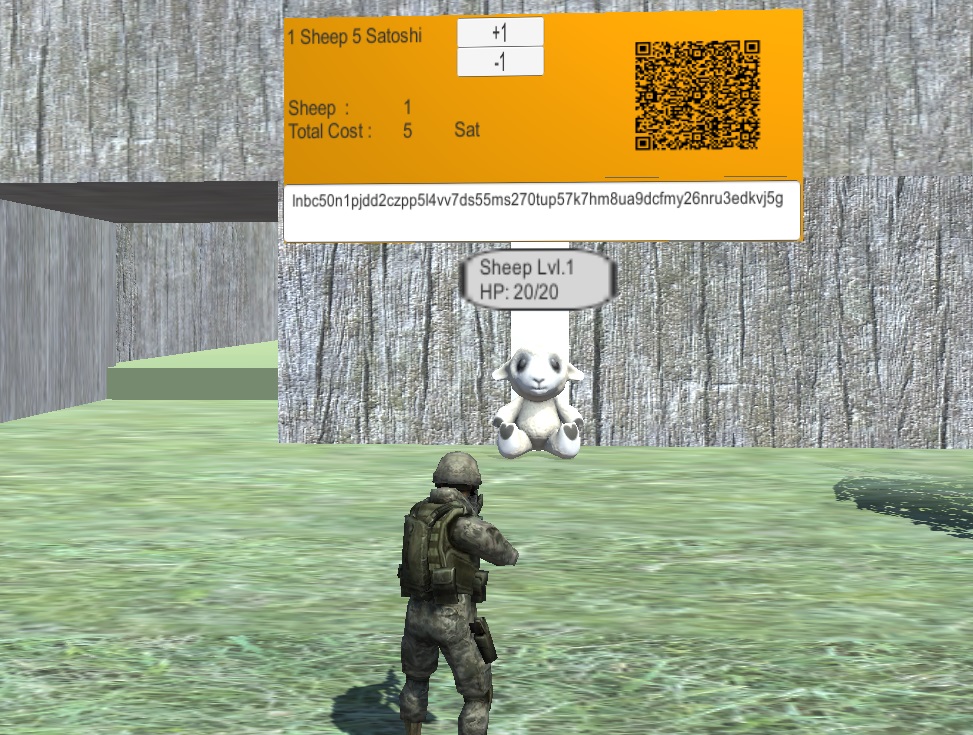
Here is what you need to do:
- Click the "+1" button to create a 5 sat invoice.
- Pay the invoice with any Lightning Wallet. Scan the QR code with your mobile wallet or click the QR code and press the "Pay" button in your browser.
- The sheep spawns inside the game.
Character Movement
You can choose between Third Person or Free Camera setting. You can change them in the options menu.
Depending on what you choose, you can move differently.
Third Person (default)
Move with w,a,s,d
Move camera by holding 'right mouse' or 'Alt' or 'Shift'
Character looks in camera direction (like in Ego-Shooters)
Free camera
Move by clicking on the ground
Or move forward or back with 'w' and 's' and turn right or left with 'a' and 'd'
Move camera by holding 'right mouse' or 'Alt' or 'Shift'
Autoshoot on enemies by double clicking them
HotKeys
Hotkeys are displayed at the bottom, you can drag any item onto a hotkey 1-9 and trigger it by pressing the hotkey.
The items apple, banana and kiwi can be thrown by holding the hotkey and releasing it after a short delay. The longer you hold, the further you throw.
The last hotkey is actually a mouse event. It is triggered if you hold any of the keys 'right mouse', 'Alt' or 'Shift' plus a left click.
Fight
Fight with a gun
You are a soldier with a gun, so the gun is our standard weapon.
To trigger the gun, you must place the gun symbol on a hotkey. By default the special hotkey is used, so you shoot with holding either 'right mouse', 'Alt' or 'Shift' plus left click.
Fight with fruits
You can throw apples, bananas and kiwis on the enemies and let them explode by pressing the bomb hotkey.
Fight with wizard skill
After you reach certain levels you can purchase skills like a meteor or a lightning strike to damage your opponents.
Those attacks consume some MP, but are stronger than your gun.
Livestreams — let your audience alter your game
Live stream PenguinShooter on Twitch or YouTube. Your audience can request invoices to alter your gameplay. If the invoice is paid by the audience, the webserver notifies the game client of the streamer. It is now possible to freeze the streamer, buy/steal items, lock camera settings etc. Test this out and create invoices at the PenguinShooter store while opening the game in a second window.
Collect rewards — you get 80% of the sats
Inside the game, you can add a Lightning Address or an LNBits invoice key. When your audience pays any invoices, you can get 80% of the sats forwarded to your wallet. Inside the game, open the options menu (press 'O') and select Lightning. For guaranteed payment forwards, create an account on the wallet page and add the LNBits invoice key.
Options to influence a friend's gameplay
Buy Upgrades
- HP / MP potions
- Weapons
- Revive when dead
- Make invincible
- Send a nice message
Buy Handicaps
- Steal items
- Hide monsters
- Hide cursor
- Send back to start
- Change camera setting
Neutral payments
- Change music
- Make jump
- Make the sun go down
- And watch how your friend reacts
Ready to play?
Jump into PenguinShooter or open the store to interact with gameplay events.